Inline BOQ Editor Features
Discover the exact controls, tools, and real-time editing features available inside the AI BOQ spreadsheet workspace.
Complete Control Over Every Quantity & Rate
Every tool and action in the editor is built to give quantity surveyors and contractors precision without rigid locks.
Document Heading & Project Renaming
Click the pencil button on the document heading to rename your project at any time, saving updates directly across all views.
View Floor Plan Reference
Open your architectural drawing in a split modal right inside the editor to cross-verify dimensions, wall lengths, and room labels without leaving your workspace.
Revision History & One-Click Restore
Track every saved revision with timestamps, changes, and user tags. Revert back to any previous state with instant restore.
Real-Time Item Search & Live BOQ Total
Search items instantly by code or keyword (e.g., A.1, concrete, plaster). Watch the grand BOQ Total update dynamically in brand brown styling.
Undo & Redo Actions
Revert or re-apply accidental edits, quantity modifications, or row deletions with native undo and redo buttons in the top tools bar.
Add & Organize Work Sections
Create new custom work categories (e.g. Substructure, Superstructure, Finishes) and choose whether to place them at the beginning, end, or after any existing section.
Custom Columns (Add & Delete)
Add custom data columns (e.g., Material Specification, Notes, Subcontractor Code) after any standard column, or delete unwanted columns.
Add Items & In-Row Quick Insert
Add items via the top tools modal or click the in-row (+) button to insert brand-new items directly below any existing line.
Create Unpriced BOQ
Generate an unpriced tender bill with one click, clearing rates and totals so you can send blank schedules to subcontractors and suppliers for bidding.
Section Filter & Real-Time Counts
Filter down to any specific section or view All Sections, showing a permanently verified count of total sections and components.
Interactive AI Assistant Panel
Toggle the split-screen AI assistant to ask questions about quantities, request calculations, or adjust line item rates using natural language.
Professional PDF & Revision Download
Export your finalized revision as a formatted, compliant Bill of Quantities PDF report ready for tender submissions.
Editor Workspace Overview
Real-time layout with header actions, floating tools bar, live totals, and split AI assistant.
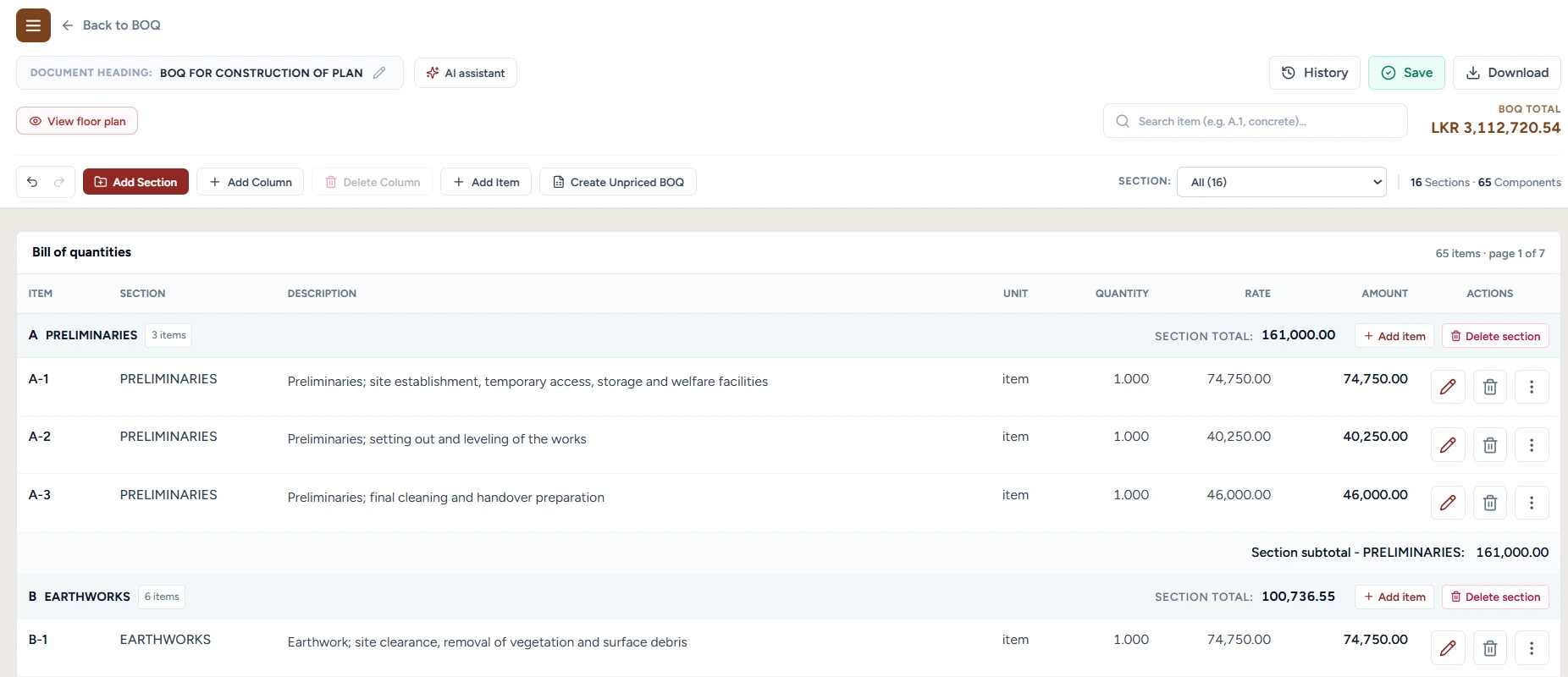
Table Row & In-Place Cell Controls
How editing, row insertion, and row flagging function inside individual sections.
Double-Click / Click to Edit
Click any line item to turn its description, unit, quantity, rate, and custom fields into interactive inputs. Click the green checkmark to save or the gray X to cancel.
Flag Items for Review
Use the three-dots (...) row menu to flag questionable rates or complex takeoff lines with an orange flag, making them easy to spot and verify before final signoff.
Section Totals & Scroll to Top
Each work section displays subtotal amounts and item counts. Bottom pagination automatically scrolls smoothly back to the top when changing pages.
Experience the Inline BOQ Editor
Upload a floor plan and explore real-time inline editing, custom columns, and unpriced BOQ generation firsthand.